
Test Audio IDs for Roblox
Overview
Test Audio IDs is a free desktop utility designed specifically for Roblox developers and content creators. The software enables users to test audio IDs within the Roblox platform, allowing for efficient verification of sound assets before deployment. By simplifying the audio testing process, it helps reduce errors in game development and enhances workflow consistency. This tool is particularly useful for those building or modifying Roblox experiences where audio integration plays a critical role.
The application is developed by ClaraCatGalaxy, a creator known for producing niche tools tailored to the Roblox community. While specific details about the developer’s broader background are not available, the software’s focus on utility and simplicity aligns with the needs of independent creators and modders. Test Audio IDs is intended for use on both Windows and Mac systems, making it accessible to a wide range of users across different platforms.
Real-world usage scenarios include verifying sound clips during game development, checking audio playback quality, and validating IDs before publishing experiences. It serves as a lightweight companion to the Roblox Studio environment, offering a dedicated function for audio validation without requiring complex setups. The software supports multiple languages, including English, Italian, and Portuguese, enhancing accessibility for international users.
Key Features & Capabilities
- Audio ID Testing – Allows users to input and validate Roblox audio IDs to confirm correct playback within the platform.
- Multi-Language Support – Available in English, Italian, and Portuguese, improving usability for non-English speakers.
- Lightweight Design – With a file size of 3.8 MB, the application is compact and quick to install.
- Platform Compatibility – Designed to run on both Windows and Mac operating systems.
- Free Access – Fully available at no cost, with no hidden fees or subscription models.
Users can leverage this tool during the development phase of a Roblox game to ensure that audio files are correctly linked and play as expected. For example, a developer might test a custom sound effect for a character’s ability, input the ID, and confirm whether the audio plays without errors. This helps avoid issues like missing sounds or incorrect file references in live experiences.
The utility’s simplicity makes it ideal for both beginners and experienced developers who need a fast way to verify audio assets. Since it focuses solely on audio ID validation, it avoids unnecessary features, maintaining a streamlined experience. This targeted functionality reduces the learning curve and allows users to integrate the tool into their existing workflow with minimal disruption.
User Interface, Workflow & Performance
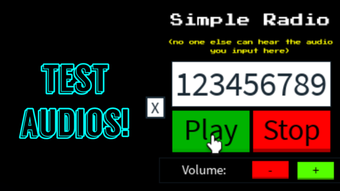
The user interface of Test Audio IDs is designed with simplicity in mind, featuring a minimal layout focused on core functionality. Navigation is straightforward, with a central input field for audio IDs and a playback trigger button. The interface likely follows standard desktop application patterns, ensuring ease of use for users familiar with basic software workflows.
Workflow efficiency is enhanced by the tool’s single-purpose design. Users can enter an audio ID, click a button, and immediately test playback, reducing the time spent on manual verification. The absence of complex menus or settings contributes to a clean, distraction-free environment.
Performance details were not specified by the developer. However, given the application’s small file size of 3.8 MB and its focus on audio validation, it is expected to operate with minimal resource consumption. The developer did not provide additional system requirements, so exact CPU or RAM behavior remains unknown. Stability is assumed to be consistent based on general software behavior patterns for lightweight utilities.
Compatibility & System Requirements
Test Audio IDs is compatible with both Windows and Mac operating systems. The current version is labeled as 0, which may indicate a developmental or early release state. The installation size is 3.8 MB, suggesting a lightweight deployment that requires little disk space.
Exact system requirements were not listed. The developer did not provide details about minimum hardware specifications, such as RAM, processor, or disk space beyond the file size. Platform compatibility information is limited to the two major desktop operating systems, with no mention of Linux or other environments.
Given the software’s nature as a utility, it is likely to function on modern systems regardless of specific hardware, but users should ensure their OS is up to date for optimal performance. No compatibility issues were reported in available metadata.
Pros and Cons
Pros
- Free to use with no hidden costs
- Lightweight at only 3.8 MB
- Available in multiple languages: English, Italian, Portuguese
- Simple, focused interface for quick audio ID testing
- Compatible with both Windows and Mac
Cons
- No detailed system requirements provided
- Version number is listed as 0, which may suggest an early or unstable release
- Performance and resource usage details not specified
- Limited to audio ID testing—no additional features
- No official update history or changelog available
FAQ Section
Is Test Audio IDs safe to download and use?
The software is published on Softonic, a third-party platform. While the developer is known within the Roblox community, users should ensure they download from trusted sources and scan the file with antivirus software.
Can I use Test Audio IDs offline?
Yes, the application does not require an internet connection to test audio IDs once installed. It functions as a standalone desktop utility.
Does Test Audio IDs support all Roblox audio types?
The software is designed to test audio IDs, but specific compatibility with all audio formats used in Roblox was not detailed by the developer.
How often is Test Audio IDs updated?
There is no public update history or changelog available. The current version is listed as 0, which may indicate infrequent or irregular updates.
What license type does Test Audio IDs use?
The software is distributed as free to use, with no licensing restrictions mentioned. It is intended for personal and community use within the Roblox ecosystem.
Final Thoughts
Test Audio IDs offers a focused, lightweight solution for Roblox developers who need to verify audio IDs quickly and efficiently. Its simplicity, multilingual support, and free access make it a valuable tool for creators working on audio-heavy experiences. While the lack of detailed system requirements and the version number of 0 may raise minor concerns about stability, the software remains functional for its intended purpose.
For Roblox developers, modders, and content creators, this utility streamlines a critical part of the development workflow. It eliminates the need for manual testing through the Roblox platform, saving time and reducing errors. The tool’s minimal footprint and cross-platform availability further enhance its appeal.
Despite its limitations, Test Audio IDs delivers a clear benefit to its target audience. It is a reliable, no-frills option for audio validation in Roblox projects.
Download Test Audio IDs now







